
Although the latest US flagship has finally ended the legacy of USB 2.0 and has now adopted USB 3.0, many USB 2.0 models still suffer from the torment of MTP transfers: slow transfers, slow loading, and easy disconnections, especially when opening folders with large files—for example, opening a DCIM album takes a long time to load, and data transfer may stall halfwayMobile phonesIt suddenly stops and has to reload for a long time, comparing where the transmission ended and disconnecting—in short, all kinds of inconveniences. Then you can try using FTP wireless transfer instead of the slow and cumbersome USB 2.0. It offers more stable connections, faster loading speeds, and can access your phone's clone space
ComputerSoftware needed: Beyond Compare, a paid file management and comparison software. Of course, you can find a learning version yourself. This software is powerful in that it can thoroughly compare the similarities and differences between any two folders or files, making it especially suitable for synchronizing, comparing, and increasing files between computers and phonesUpdate, supports both MTP and FTP connections. I have always used this software to back up and manage files on my phone, allowing me to clearly see the differences between new and old files on my phone and local backups, making incremental backups convenient.
1. First, your phone and computer should be on the same internal network environment, for example, your computer and phone are connected to your homeWiFiThe router, or the phone and computer are connected to the same deviceHot topicWiFi, or you can set up a hotspot on your phone to connect to your computer, or set up a hotspot for your phone to connect—in short, it's all within an internal network environment.
2. Open your phone's file management, tap the menu in the top right and select Remote Management. Tap Settings in the top right corner, set the simplest username and password, such as 1234, then tap Start Services and choose whether you want to access internal storage or filesApplicationClone Space is set up on the phone, and it will show you a oneIP addressFor example, 192.168.123.456:1234, the colon before is the IP address, and the colon after 1234 isPortNumber
3. On your computer, open Beyond Compare, select Folder Compare, click the Browse folder icon in the file path section on the left window, and select FTP in the dialog box that appearsProfile file, in the host section, enter the part before the colon of the phone's IP address, enter the part after the colon on the port, then enter the username and password you set
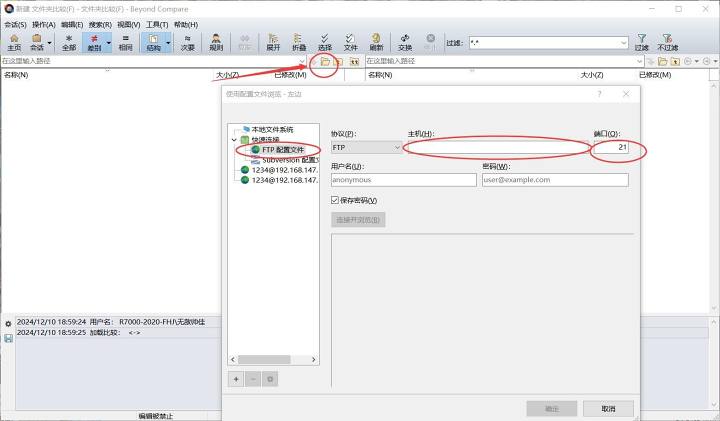
Then click OK, and you can directly browse and manage files on your phone wirelessly on your computer! Compared to USB 2.0, this file list loads much faster! Especially with folders loaded with large files, the loading speed is MTP under USB 2.0
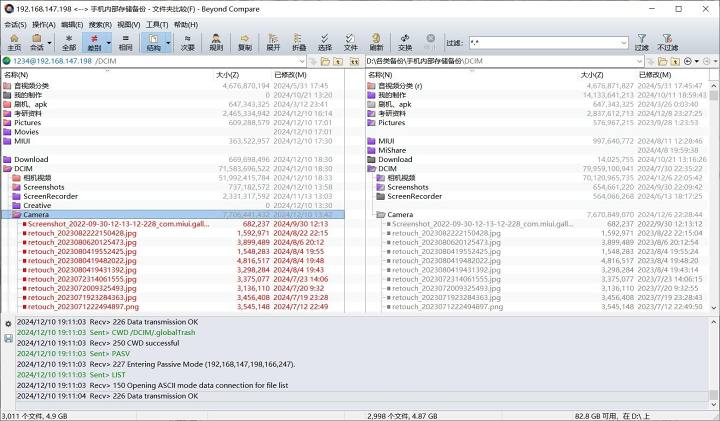
The window on the right is for comparison. You can create a folder on your computer to back up your phone's files. As long as the file and folder names match, the software will automatically start comparing file sizes, dates, and more, displaying them in different colors. You can also double-click to preview and compare files on both sides. Images, Word, and Excel can all compare, making it very convenient!
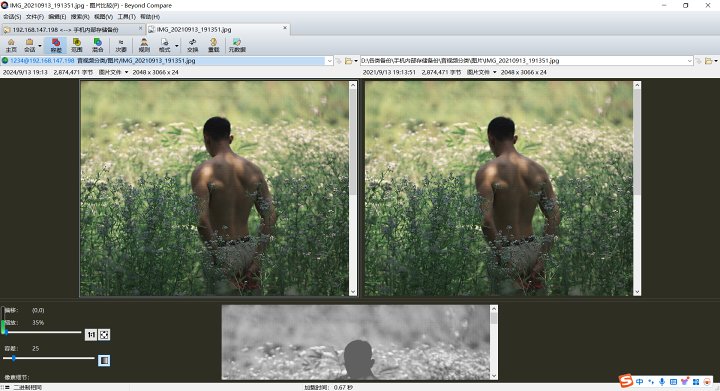
You can also remember some shortcut keys, such as Ctrl+R to copy files from the left to the right, and Ctrl+L to copy files from the right to the left. This allows you to efficiently and quickly compare local files with files on your phone and sync back and forth.
Of course, this FTP method still has some drawbacks. When comparing, the dates on both sides of the file show the modification time on one side and the creation date on the other, causing the same file to be marked in red. This problem disappears when transferring via USB. This software is much easier than Windows Explorer when connected via MTP wired connection! For folders loaded with thousands of files, it is faster than File Explorer and more stable for file transfers~ Although FTP is wireless and wired, there are still differences, but it still provides another file transfer solution for USB 2.0
Original link:https://www.coolapk.com/…
![[Open Source Reading] January 2024 ≈ 400 carefully edited book source compilation and update - Baiyun Blog](https://www.bybk.cc/wp-content/uploads/img/af867764c3780f0b7da88376fca7bf92.png)
![[Open Source Reading] November 950+ carefully proofread book source compilation and update - Baiyun Blog](https://www.bybk.cc/wp-content/uploads/2023/02/Screenshot_20230222-1001582.png)
![[Open Source Reading] October 1300 Book Source Update - Baiyun Blog](https://www.bybk.cc/wp-content/uploads/img/1eeb6ae31cde88ab39faa2f19651638d.jpeg)
![[VMOS PRO 2.9.6 Member Edition] - Baiyun Blog](https://www.bybk.cc/wp-content/uploads/img/c303a7a50d3ebfa235cc380190db2980.png)
![[Open Source Reading] November 950+ carefully proofread book source compilation and update - Baiyun Blog](https://www.bybk.cc/wp-content/uploads/2023/02/Screenshot_20230222-1001582-1024x593.png)




No comments yet