
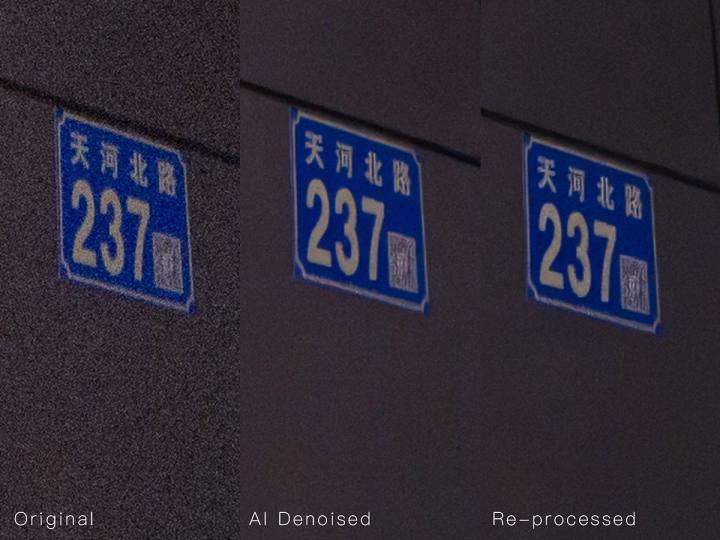
🧠 ProcessingApproach:
1. Create a new layer for AI noise reduction, and place the layer blending mode after AI noise reduction from "normal" to "brightness" above the original layer to eliminate false colors;
2. Creates a brightness mask based on AI-generated denoising layers, controlling the noise reduction range and only denoising gray to dark areas in the image, reducing interference with bright and bright areas.
*For detailed steps, please refer to the images below, in orderRead onThat's it.
🖥️ Supported software:
Topaz Denoised AI & Topaz Photo AI、ACR、LR。
DXO PureRaw's distortion correction effect is inconsistent with ACR and LR, so if the lens has built-in correction files, unless correction is disabled in both DXO PureRaw and ACR, the degree of correction may vary, causing the noise reduction layer and the original layer to not align properly. For lenses with built-in calibration files, after turning off lens correction in ACR, you cannot access the built-in correction files after entering Photoshop.
Of course, if you are using contactless manual lenses or other lenses without built-in calibration files, using DXO PureRaw for noise reduction is also feasible. You just need to disable lens correction in ACR and DXO PureRaw, then enter Photoshop and then set the layer to "Filters- Lens Correction" to call up the lens correction file according to the lens model.
*Platform image compression results in less noticeable visual differences,MaterialsMost of the captured details are also in medium gray. If you're interested, you can try this method in Photoshop by finding materials.
I introduced this method at Panasonic's fifth anniversary full-frame exhibition this year (Guangzhou, Changsha, Beijing). After the event, many friends privately contacted me to request courseware and learn more about this method. Here, I share my thoughts with everyone. The image shows the noise reduction process I commonly use at work, including steps to use noiseware to reduce high-frequency noise. Due to word limits, those who need detailed steps can read the following images in order. If using ACR or LR noise reduction, open both Raw images before and after noise reduction simultaneously, place the denoised Raw on the previous Raw layer, then adjust layer blending mode and create a brightness mask.


📷 The reasons for this are:
1. In low-light environments when shooting at high ISO, the most significant dispersion noise affecting the image mainly occurs in dark and medium gray areas. Bright areas and highlights have higher signal noise due to higher light intake than in dark areas;
2. Compared to dark areas, the human eye tends to be more sensitive to details in bright and highlights, so AI noise reduction creates artifacts and colors in bright and high areas more noticeably than in dark areas and mid-gray;
3. Noiseware is non-AI noise reductionPluginAlthough the noise reduction intensity is not as strong as AI plugins, the effect is very stable, so this noise reduction layer is set to a certain opacity buffer.
If you're not satisfied with the final result, you can still reversibly adjust the mask and layer opacity. Personally, I prefer to call ACR to control the mask range when selecting a mask.
Original link:https://www.coolapk.com/…
![[Open Source Reading] January 2024 ≈ 400 carefully edited book source compilation and update - Baiyun Blog](https://www.bybk.cc/wp-content/uploads/img/af867764c3780f0b7da88376fca7bf92.png)
![[Open Source Reading] November 950+ carefully proofread book source compilation and update - Baiyun Blog](https://www.bybk.cc/wp-content/uploads/2023/02/Screenshot_20230222-1001582.png)


![[Text and Image Summary] Summary of Terminals Currently Supporting 5G-A Carrier Aggregation --- Includes How to Check Carrier Aggregation Enabled on iOS - Baiyun Blog](https://www.bybk.cc/wp-content/uploads/2024/04/20240407140712630-e26ee861710dd3b075a1302dd00392d5e1db60a1.jpeg)
![[Open Source Reading] November 950+ carefully proofread book source compilation and update - Baiyun Blog](https://www.bybk.cc/wp-content/uploads/2023/02/Screenshot_20230222-1001582-1024x593.png)

![[Open Source Reading] October 1300 Book Source Update - Baiyun Blog](https://www.bybk.cc/wp-content/uploads/img/1eeb6ae31cde88ab39faa2f19651638d.jpeg)
![[VMOS PRO 2.9.6 Member Edition] - Baiyun Blog](https://www.bybk.cc/wp-content/uploads/img/c303a7a50d3ebfa235cc380190db2980.png)





No comments yet