
Original link:https://www.coolapk.com/…
— In various posts, we often see comments like, "It's normal to use more memory; memory is meant for use. Why do you have so much memory left in streamlining?" This is his remark. These statements more or less lack rigor. Below, I will try to use a simpler description to give you a sense of yourselfMobile phones的Memory management(Mainly virtual memory) I have a basic understanding, and it's my first time writing for a newcomerPopular scienceIf there are any mistakes, please point them out in the comments section
————— dividing line—————
Note: All "memory" mentioned in this article refers to what people commonly refer to as "running memory," that is, "RAM," not storage space!
————— dividing line—————
First, let's get to know some concepts and technical terms
1. Virtual Memory:
Virtual memory is a type of memory management commonly used in modern operating systemsTechnologyCurrently, the commonly used method is page-based virtual memory management, which is based on pages (usually 4KB) Manages memory allocation, recycling, and swapping at the minimum granularity.
2.SWAP:
SWAP is a part of virtual memory technology, dividing space on the hard drive to swap memory pages—in plain terms, moving data from memory to the hard drive to free up physical memory. Windows also has a similar feature called "Paginated File." But unlike Linux, Windows is heavily dependent on paginated files, and turning it off will cause itBig problems, For details, see the extra chapter at the end of this article.
3.ZRAM:
ZRAM is another implementation of SWAP. Instead of using hard disk space, it directly partitions memory space to swap memory pages, using compression algorithms like LZ4/ZSTD to compress memory data to free up physical memory.
4.ZRAM Writeback
ZRAM Writeback is an extension of ZRAM. Like SWAP, it creates swap files on the hard drive space to swap memory pages. The difference is that ZRAM Writeback exchanges compressed memory data. Write control logic runs at the user layer rather than the kernel, and the specific strategy is determined by the system vendor, so this article will not discuss it.
5. Direct recycling and asynchronous recycling
There are two types of memory reclamation: asynchronous collection runs on the background thread and does not affect the current process, which has little impact on performance and smoothness, but the collection speed is slow; Direct reclamation is fast but blocks the current process, resulting in the software interface freezing for a short period (usually very short), which significantly affects performance and smoothness.
————— dividing line—————
First, let's answer the question in the title: "The more memory you use, the better?" Is this statement correct? Yes, but not entirely.
Memory is indeed used, but it's important to know that memory is not only used by the operating system and user software; another major factor is file caching. Almost all operating systems have file caching mechanisms. Files read from hard drives or flash storage are cached in memory, so next time you call the file cache directly without reading from the hard drive/flash to speed up the process. When memory is insufficient, file caches can be quickly freed up for allocation, so both the quickly recovered memory and free memory are treated by the kernel as "available memory." But what you see in the system backend interface and various software (such as DEV Check) is not "free memory," but rather "available memory" calculated by the kernel or the software's own algorithms.
As shown in the picture, the kernel is in the memiIn NFOs, "available memory" ≠ "free memory": "free memory" refers to unallocated memory that is not actually occupied by any processes or files, while "available memory" refers to memory that can be allocated (its size is an estimate, mainly determined by the portion of file cache and free memory above the Low watermark and other memory items that can be quickly recovered)
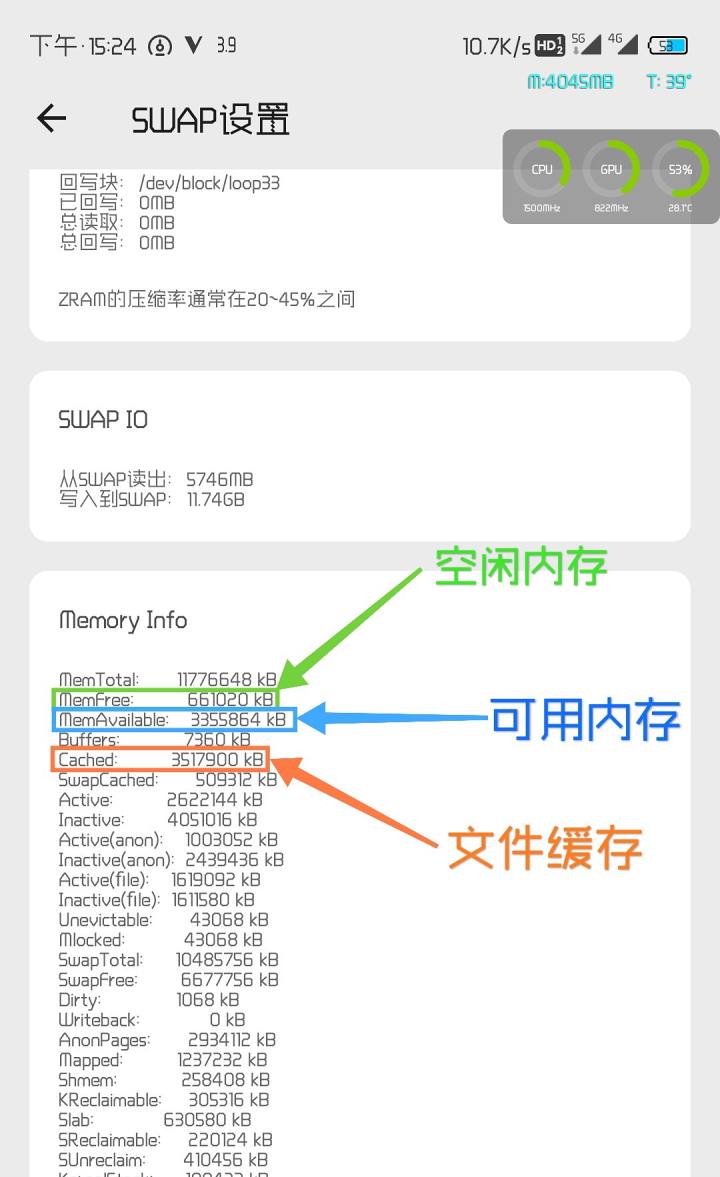
Data source: /proc/meminfo
So even if you see a lot of memory left in the system background or in various apps, it doesn't mean the memory is being fully utilized. Instead, they streamlined itOptimizationFor those people, like me, I am pursuing to reduce the system's own memory usage, so that more memory can be freed up for usersApplicationThis does not conflict with the view that "using more memory is normal; memory is meant for use."
————— dividing line—————
AdvanceTutorial— Controlling memory recycling and ZRAM initiatives:
PossessingROOTYou can modify the kernel parameters below to control memory reclamation and ZRAM activity.
1. vm.watermark_scale_factor:
Control the interval between memory water level lines, with an adjustment range of 1~1000 (corresponding to 0.01% to 10% of total memory size). If the value is too low, it will frequently trigger direct recyclingLagIf the value is too large, it will waste memory. It is recommended to set it to 100 (1% of total memory).
The kernel defines three watermark lines: min/low/high. When free memory (note: "free memory" rather than "available memory") falls below the low watermark, the kernel wakes up kswapd to asynchronously reclaim memory (swapping data to ZRAM/SWAP and reclaiming file caches) until free memory exceeds the high watermark; When idle memory falls below the min water level, direct recovery is triggered. The value of the min water level line is calculated by the kernel based on total memory size and vm.min_free_kbytes calculation. It is not recommended to modify this parameter and keep the default value.
2. vm.extra_free_kbytes:
Additional reserved memory will have a set value between the min and low watermarks. If the value is too low, it will frequently trigger direct reclamation and cause lag; if too large, it will waste memory. It is recommended to set it to 1~2% of the total memory size, measured in KB.
3. vm.swappiness:
When kernel memory is insufficient (below the low threshold), the bias between the swap page and ZRAM/SWAP and the recovered file cache ranges from 0~200, and from 0~100 for older kernels. The smaller the value, the more likely it is to collect file caches; the larger the value, the more likely it is to use ZRAM/SWAP.
The above kernel parameters are availableSceneYou can also use root privileges to execute the following commands to modify it:
echo 100 >/proc/sys/vm/watermark_scale_factor
echo 131072 >/proc/sys/vm/extra_free_kbytes
echo 100 >/proc/sys/vm/swappiness

– If you want to keep more backend, you can reduce the value of extra_free_kbytes and watermark_scale_factor and moderately increase the value of swappiness.
– If you want higher smoothness, you can increase the extra_free_kbytes and watermark_scale_factor values, while adjusting swappiness to a more balanced value.
– If you want it both, then get a phone with bigger memory
————— dividing line—————
LMK and Backstage Killing:
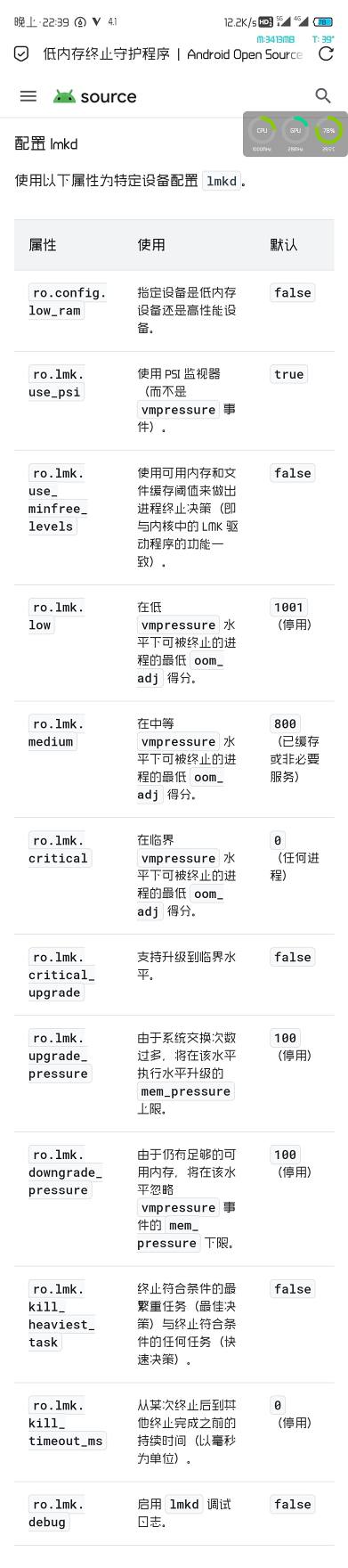
Starting from Android 9, Google began abandoning the built-in LMK kernel in favor of LMKD, which runs as a daemon for the system. Therefore, background app killing and the kernel itself have little to do with each manufacturer's approachConfigurationLMKD/Introduced other background removal mechanisms. Regarding thisMIUIIn addition to configuring LMKD, there is background killing code in both "Battery and Performance" and "Framework System Framework." If you don't want to use the additional background kill mechanism introduced by the manufacturer and want to configure LMKD yourself, then this is a good optionLSPosedThe "AppRetention" module blocks the vendor's background end elimination mechanism.

Then, configure LMKD according to Google's documentation:View the link
————— dividing line—————
Extra Section — Additional knowledge about Windows paging file Pagefile.sys and virtual memory address allocation:
Windows uses a two-stage memory allocation (reserved + commit), and during the commit phase, it is essential to ensure the mapping of physical addresses (physical memory or paging files). Paging files are part of the system's submission limits and directly determine the total amount of virtual memory the system can support (on the Windows Task Manager memory card page, there is a data item called "Committed"; the left side of the slash is the sum of all program requested memory sizes, and the right side is the total virtual memory size, with values = physical memory size + paging file size, where the paging file is dynamically partitioned by the system).
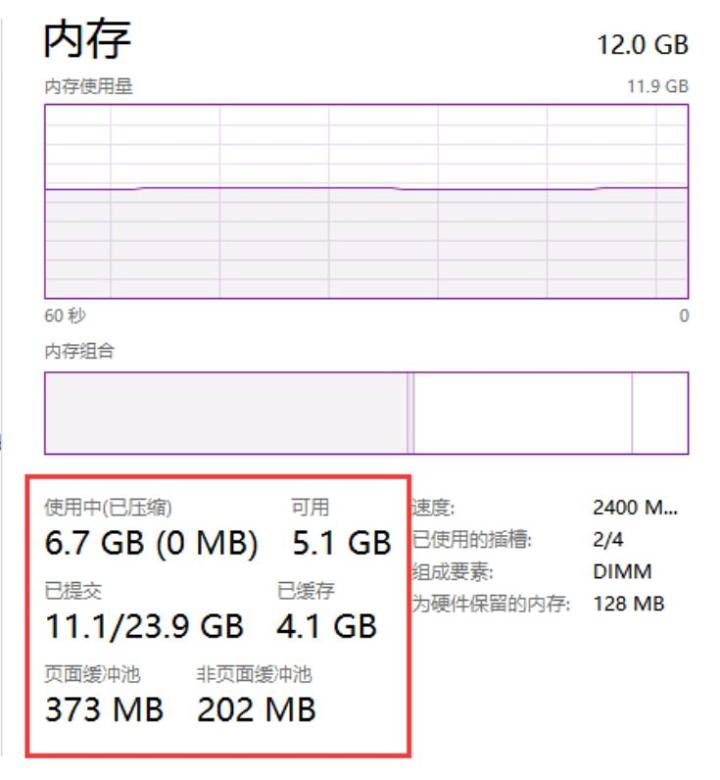
Memory information for Windows Task Manager
You can simply think that when a program allows for a certain amount of memory on Windows, the system allocates the corresponding physical address size to the program. After allocation, other programs cannot use this memory space, and the memory allocated by the program is generally higher than what it actually needs. Therefore, when closing paging files, there may be cases where there is a lot of physical memory left, but opening a new program still prompts that the memory is insufficient. Linux, however, does not have this problem. Linux uses a delayed allocation strategy, allocating physical memory addresses only when processes actually access memory. As for the memory requested by the program, Linux allocated "real" virtual addresses, and the limits of virtual memory addresses are determined by the "vm.overcommit_memory" kernel parameters. On Android phones we use, the virtual memory allocation limit is "overcommit_memory" The default value is 1, which ignores virtual memory limits and allows allocating all physical memory.
On Scene's SWAP management page, you can see that all processes on my phone have requested up to 208GB of memory! But the physical memory wasn't used up, so I could still open new software.
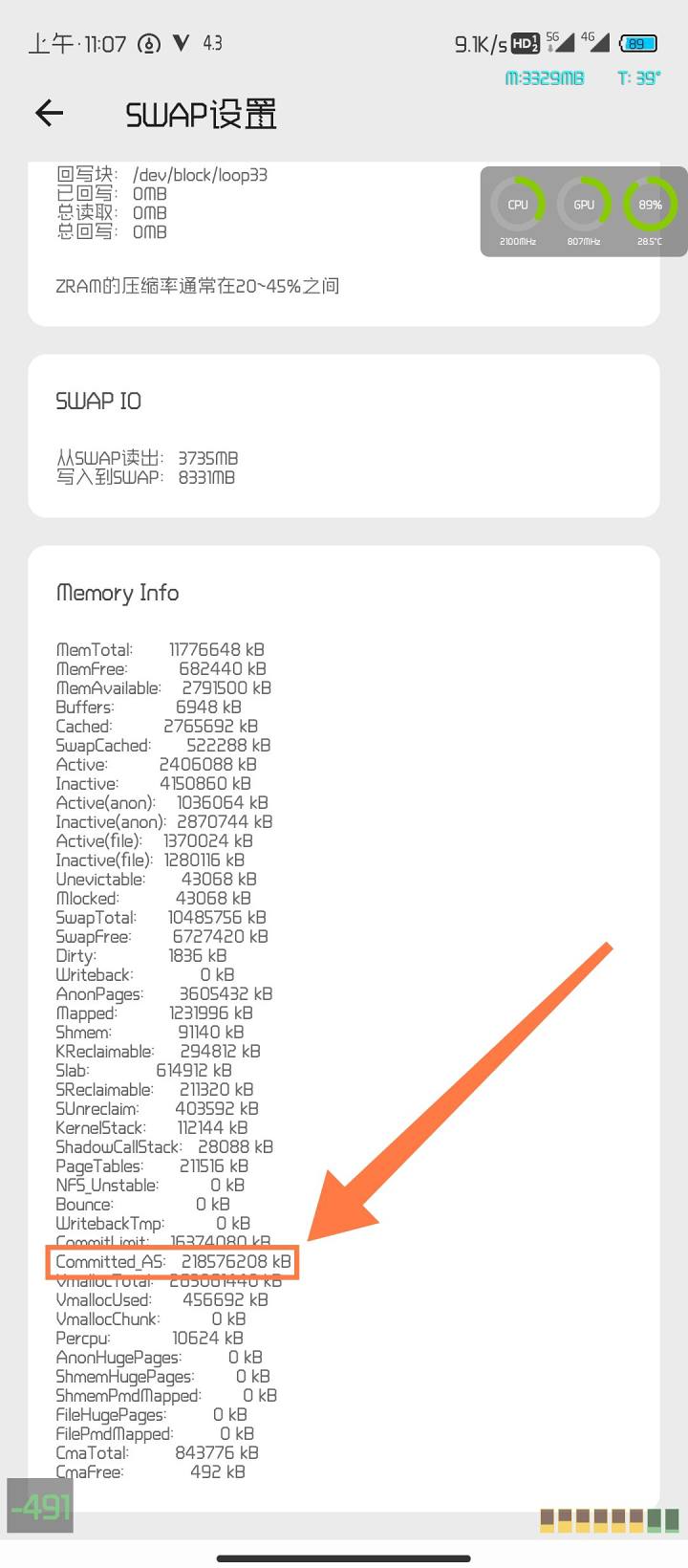
As for why Windows doesn't change to the same or similar mechanism as Linux, I don't know; I can only think it's because Windows carries too much historical burden (corresponding to WIN's legendary compatibility).
![[Open Source Reading] November 950+ carefully proofread book source compilation and update - Baiyun Blog](https://www.bybk.cc/wp-content/uploads/2023/02/Screenshot_20230222-1001582.png)

![[Text and Image Summary] Summary of Terminals Currently Supporting 5G-A Carrier Aggregation --- Includes How to Check Carrier Aggregation Enabled on iOS - Baiyun Blog](https://www.bybk.cc/wp-content/uploads/2024/04/20240407140712630-e26ee861710dd3b075a1302dd00392d5e1db60a1.jpeg)

![[Open Source Reading] January 2024 ≈ 400 carefully edited book source compilation and update - Baiyun Blog](https://www.bybk.cc/wp-content/uploads/img/af867764c3780f0b7da88376fca7bf92.png)
![[Open Source Reading] November 950+ carefully proofread book source compilation and update - Baiyun Blog](https://www.bybk.cc/wp-content/uploads/2023/02/Screenshot_20230222-1001582-1024x593.png)
![[Open Source Reading] October 1300 Book Source Update - Baiyun Blog](https://www.bybk.cc/wp-content/uploads/img/1eeb6ae31cde88ab39faa2f19651638d.jpeg)
![[VMOS PRO 2.9.6 Member Edition] - Baiyun Blog](https://www.bybk.cc/wp-content/uploads/img/c303a7a50d3ebfa235cc380190db2980.png)





No comments yet