
⚠ Frontline reminder: super, super long post, expectedRead onHalf an hour left. There is a lot of practical content, so please bring your own drinks and mineral water
⚠ The previous article introduced the journey of using CPE to break free from the campus internet poison [Real Music]. If you haven't watched it yet, XDM is interested and can check it out first
(Please give a three-comment comment)
[Link] @墨戥玳的图文: Saying NO to campus internet blacker broadband...
This graphic and text data is a pleasant surprise. Thanks to xdm for their support, it gave me tremendous encouragement. Many friends have internet troubles in comments and private messages, but when I first encountered the mixed MIFI CPE on the market, I found it hard to tell the difference [Leeuwenhoek]. In this post, I'll share my own experience on how to assess your own network environment.ShoppingNetwork equipment suitable for you. This article mainly introduces5GEquipment: For 4G devices, please move inside the station#随身wifi #Topics, there are more detailed ways to play.
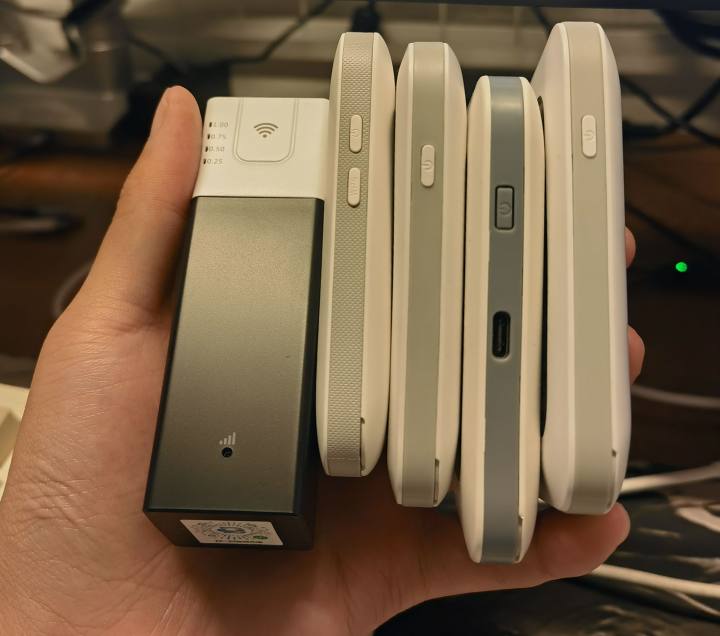
4G is fun and cheap
⚠ This article is mainly intended as a beginner's post, only introducing devices and packages with no barriers to access, offering a starting point. Experts, please selectively ignore some aspects of this article. If there are any mistakes, feel free to add them. Beginners shouldn't trust buying and selling rental number cards; many insiders have been scammed ⚠
Advice: If you can extend broadband, I still recommend adding a broadband
———————— Preface and Introduction————————
First and foremost, the essence of network devices and youMobile phonesOpenHot topicIt's the same—it converts the wireless signals from the base station intoWiFiSignal for internet access [yyds]. Compared to phones, their advantages lie in higher stability and stronger antennas, providing a relatively comfortable network environment under weak network conditions. For users who cannot expand broadband or whose bandwidth is too dark (renters, university dormitories, small businesses), CPE is a relatively economical and convenient solution.
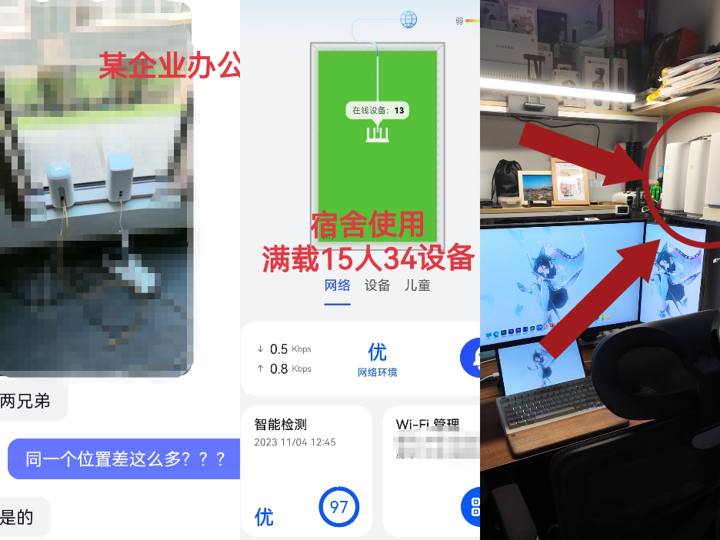
SomeUsage scenarios
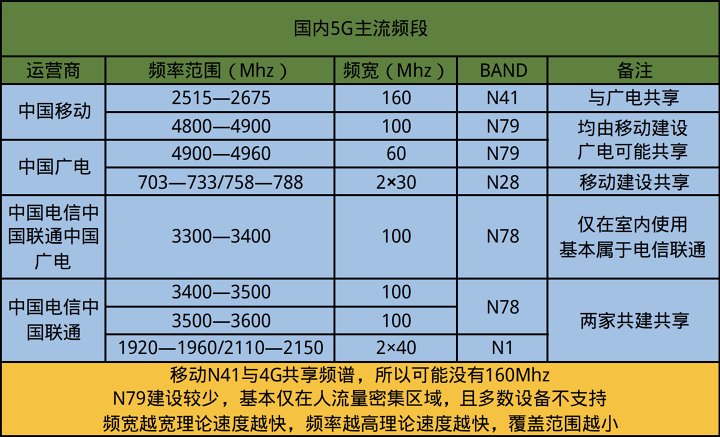
Mainstream domestic 5G bands
Below is an introduction to the main 5G bands from each company.
"Guangmi" is almost entirely mobile construction and broadcasting sharing. The main high-frequency band for these two companies is N41 at 2.6GHz, with a peak bandwidth of 160MHz, of which 60MHz is for 4G, so full bandwidth is 100MHz. In some regions, 4G hasn't been cleared, leaving only 60MHz (Mhz information is needed).rootCheck on your phone or CPE). Aside from slightly higher latency, the N41 has no major drawbacks. It provides decent coverage and speed, and under good conditions, it can basically run up to 1200Mbps. However, the N41 has a large user base, and the experience is poor in some densely populated areas.
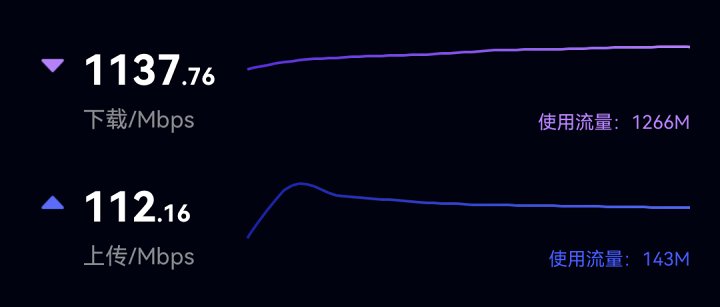
N41 on the pedestrian bridge outside a shopping mall
In some regions, "Guangxi" uses the 4.9GHz N79 frequency (some areas cannot share and use the broadcast network; specific tests are conducted). They are generally found in areas with very high foot traffic (such as shopping malls, airports, scenic spots, etc.). The peak bandwidth is 160MHz (sometimes even 200MHz), but currently only mobile bandwidth is 100MHz. Only a small portion of the N79 is availableFlagship phones(You can check if your phone model supports N79). Due to its high entry barrier and naturally low user base, the N79 has low network congestion rates and excellent latency performance. However, as the highest-frequency 5G system in China, it has fewer installations and weaker coverage through walls.
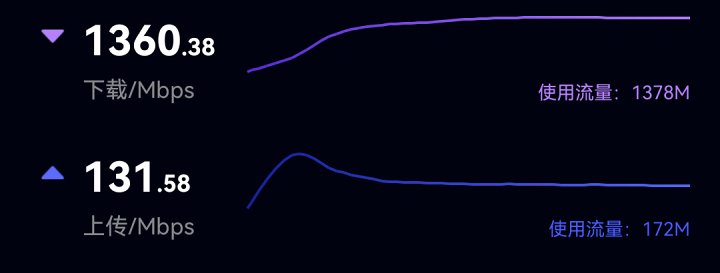
N79 at a certain university
"Guangyi" also has the 700MHz N28 band, commonly seen in township 5G. Both the upper and lower levels have 30MHz, broad coverage, poor anti-interference capability, and a large user base, with typical speeds within 300Mbps. In most regions, N28 works just like 4G. Currently, in line with policy requirements, almost all N28 in urban areas of prefecture-level cities have enabled REDCAP (low).Power consumptionLow-rate 5G) features, RedCap may eventually replace 4G.
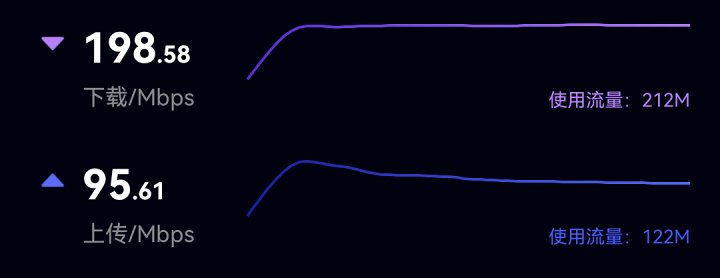
N28 Redcap by the side of the second exam hall for a certain subject
Next, let's talk about "telecommunications". The vast majority of regions are built in telecommunications,UnicomSharing. The main high-frequency band of these two companies is the 3.5GHz N78 band, with a peak bandwidth of 300MHz. The 100MHz alone is only for indoor use, while the other 200MHz can be configured as 5G + dual carriers depending on needs. Adding the indoor 100MHz can form a full-power N78D 5GA triple carrier, which is the so-called 5.5G running 400 to 500Mbps. However, most places still use a single 100MHz carrier. N78 is a very balanced band, with good speed, coverage, and latency. Compared to mobile, it has slightly fewer users, though high-user areas can experience congestion like N41.
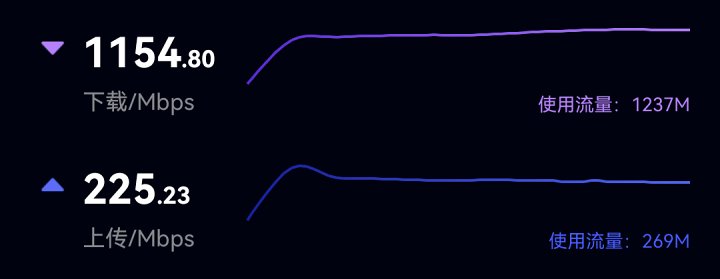
A certain university has an N78 exam
The main low-frequency band of "Dianlian" is the N1 band at 2.1GHz, with 40MHz both upstream and downstream, which is also common in township 5G. Overall, it's similar to the N28 but with higher frequencies and a wider spectrum. If fully enabled, the speed can reach 500-600Mbps, but in most regions it's only 20MHz and speeds below 300Mbps. In the future, it may also be mainly used for RedCap. "Dianlian" also has low-frequency devices like N3 and 58, which have been built less and don't perform like the 5G I imagine, so I won't elaborate here [yyds].
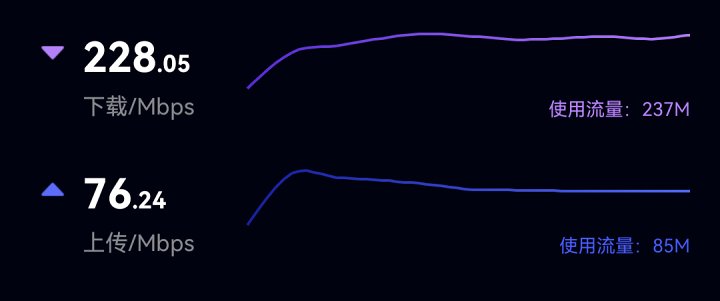
N1 at 20 MHz in the suburbs
Alright, now that everyone has a basic understanding of the 5G network bands and characteristics of the four major operators, let's add some additional knowledge. In the recent illustration, I wonder if you noticed [Leeuwenhoek]—the N1 and N28 have a "vertical equal bandwidth," and there are also "two frequency ranges."
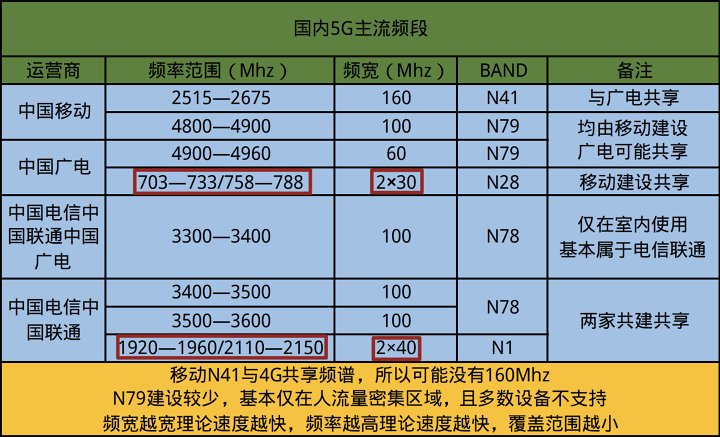
As shown in the picture
This is because both use FDD "frequency division duplex," which means there is a two-way lane that can simultaneously send and receive data packets and upload themDownloadDuring activity, they do not interfere with each other. The other bands shown in the chart are TDD "time division duplex," meaning only one lane can receive data and transmit data within one time. However, since the data is at the speed of light, it's hard to notice. Newer walkie-talkies also operate on TDD principles. We won't go into detail about which of these two models is better or worse; let's get straight to the point of their respective strengths.
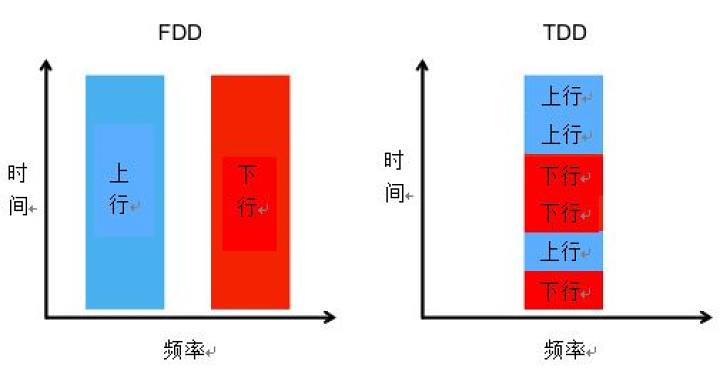
Schematic diagram, image source: Tencent Cloud Developer Community
The advantage of the FDD band is its wide coverage, with uploads and downloads not affecting each other. It provides more stable uploads than TDD, and is more stable and reliable in high-speed mobile environments. If your N1N28 performs decently and you need outdoor mobile live streaming for mobile uploading, then you can choose to use it. FDD's downside is relatively low speed and susceptibility to interference. You can test it in real life; some towns have a very good experience with N1 and N28.
The advantages of the TDD band are high speeds and strong anti-interference capabilities, providing a relatively comfortable network environment in densely populated areas. But the downside is that the coverage is smaller and more extremeElectricity consumption, and upload/download tasks cannot be performed simultaneously. You can try connecting to the TDD band to activate the hotspotGames, and if you send a large file at the same time, the game will most likely lag and become unplayable. However, for the vast majority of people, download demand outweighs upload, so TDD is generally more suitable for most people, and carriers also build their main base stations with TDD.

TDD upload is noticeably noticeable
Additionally, one more download wavePolymerization5GA (5.5G). Simply put, carrier aggregation means connecting multiple frequency bands at once (which can be 2, 3, or even more). Some devices connect to 200MHz multicarriers and the status bar will display 5GA. However, due to the different characteristics of each frequency band, the construction and terminal equipment capabilities vary by region. There may be situations where multiple carriers cannot beat a single carrier, which is normal and nothing to worry about. Non-rooted phones basically can't view multicarrier info, so at this stage, it's not recommended to get too hung up on carrier aggregation and 5GA.TechnologyImplementation also takes time [yyds].
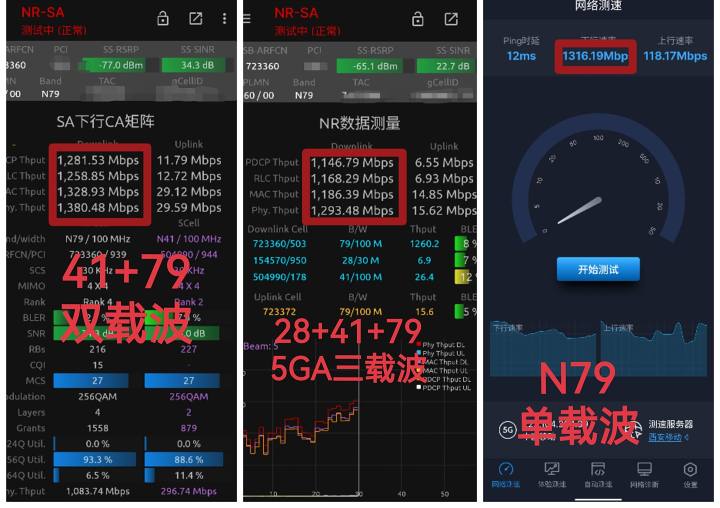
I tested the data myself
Alright, now everyone has a fairly complete basic understanding of the frequency bands of each operator. The content might be a bit dry, so you can take a sip of water to help you refresh yourself. Next, I'll teach you how to distinguish the specific network quality of each frequency band in your environment.
———— Network Environment Analysis · Actual Quality Section ————
Before starting the analysis, everyone needs to prepare for the testTools: A 5G flagshipAndroidMobile phone (try to support N79), two SIM cards (choose either Guangyi Mobile for best China Mobile or Telecom for either one), and then on the phoneInstallationHuawei"Petal Speed Test"APPAnd grant the necessary permissions.
Extraction code: 2333. If it says you can't download from your phone, switch your browser to 'PC' or open your browserComputerPattern.
The testing method is applicable to all frequency bands. Try to use only the SIM card you need to test during testing, as results from a single SIM card are more accurate. Step one: Open Huaban Speed Measurement and follow the steps to the desired page (starting with "Service Community").
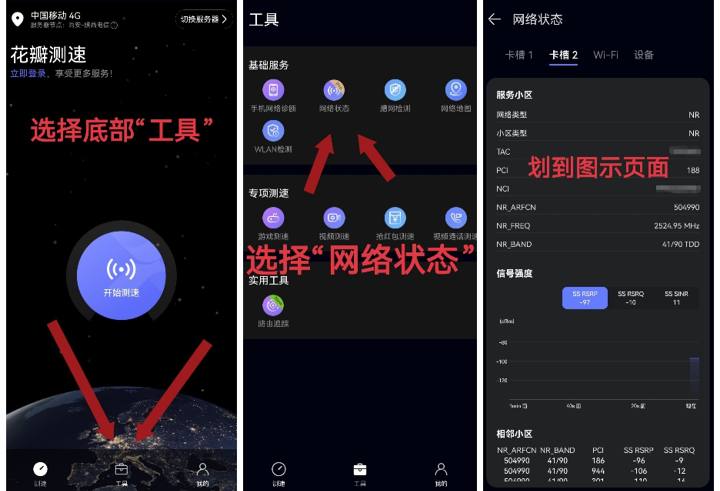
Follow the diagram
Then you can see the current network signal parameters of the SIM card. The most basic is distinguishing between 5G and 4G. In the network type, if NR is displayed, it means 5G, and LTE is 4G. Note that if you only have 5G frequencies, the connection is SA. If there are 4G frequencies, it means the connection is NSA. NSA is generally not very user-friendly, so you need to move the switch to airplane mode to connect the phone to SA.
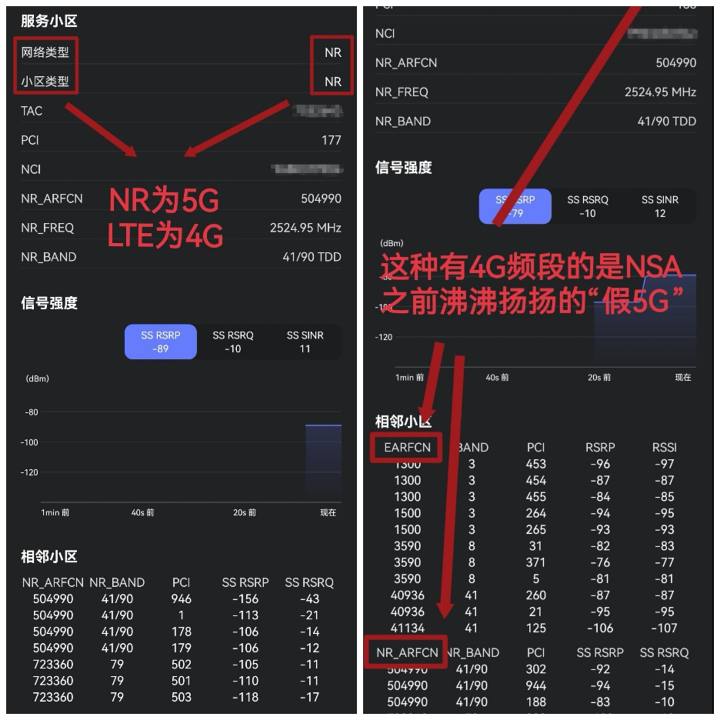
Basic network types
Next, let's look at the current network information and quality. First, look at the NR_BAND marked on P1 below to determine which band is connected. Usually, the number is what it is, but N41 will show as 41/90, and N78 as 77/78. Next, look at the PCI to determine the specific area number connected to the band, which can be understood as different room numbers for staying at a hotel.
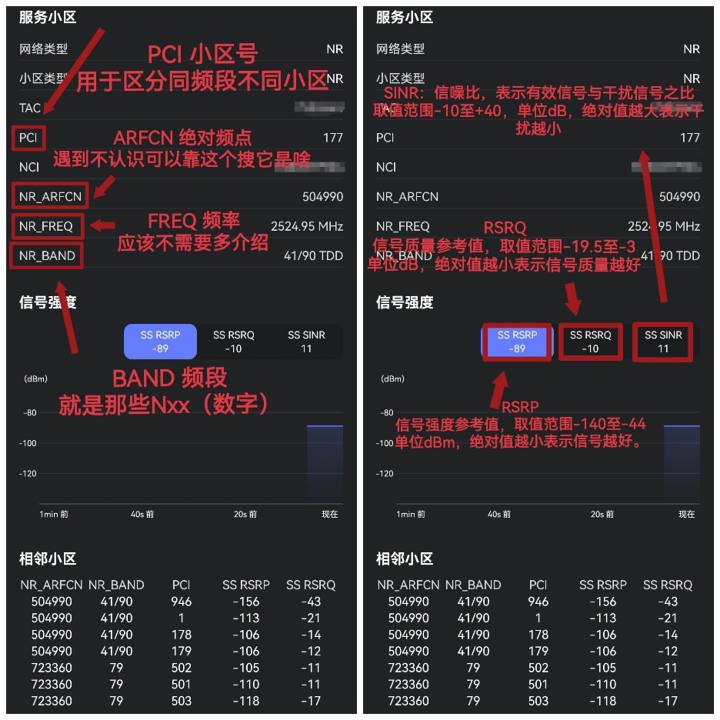
Specific information and three major indicators
Next, observe the information in the box on P2. These three indicators are the most common information about network signals that ordinary people can see.
First, let's look at RSRP, which represents the current signal strength reference value, ranging from -140 to -40. The smaller the absolute value, the stronger the signal. Generally, -60 to -90 is the signal range. Below -90, the signal is not good; generally, below -120, the connection is unclear. Above -55, it may cause the light to be dark (the candle cannot illuminate directly below itself), resulting in poor network quality.
Next, let's look at RSRQ, which is a signal quality reference value, ranging from -19.5 to -3. The smaller the absolute value, the better the signal quality; below -15 is considered poor.
Finally, let's look at SINR, which stands for signal-to-noise ratio, which refers to the ratio of effective signals to interference signals. The range of values ranges from -10 to 40; the larger the absolute value, the less interference. SINR greater than 10 is considered good, less than 5 is considered poor.
You can move your position closer to the window or door to find a spot where all three major indicators are good. These three indicators are only a reference and do not represent the final network quality situation, especially in areas with high population density. At this point, you can use a network speed test to further assess network quality. Go back to the Huaban Speed Test homepage for another speed. If your normal 5G speed is over 300Mbps and upload speed is over 50Mbps, it means the 5G network quality in your environment is good, and you can happily choose CPE for use. You can also directly diagnose and conduct specialized tests on the second page of Petal to detect what interests you, or even more directly, by turning on trending topics and playing games.
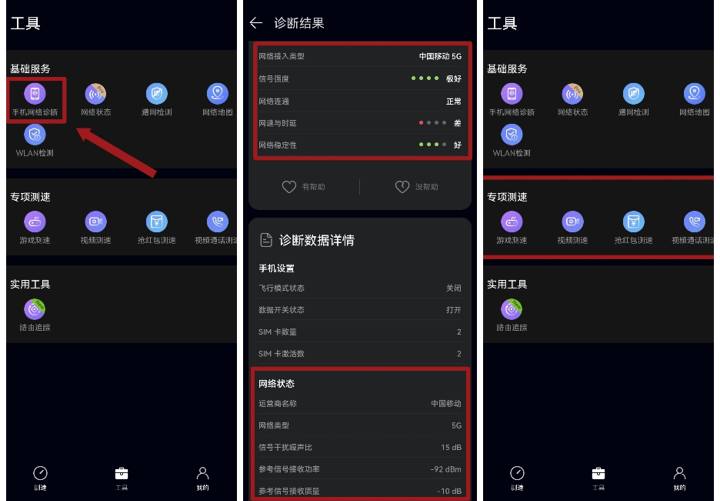
Latency is especially reflected in game and red packet speed tests
If all three indicators are acceptable but the speed is below 100 or uploads are faster than downloads, it means your area is connected to too many users and the load is high. In this case, you can try switching locations to see if you can connect to other cells or frequency bands, or try switching providers.
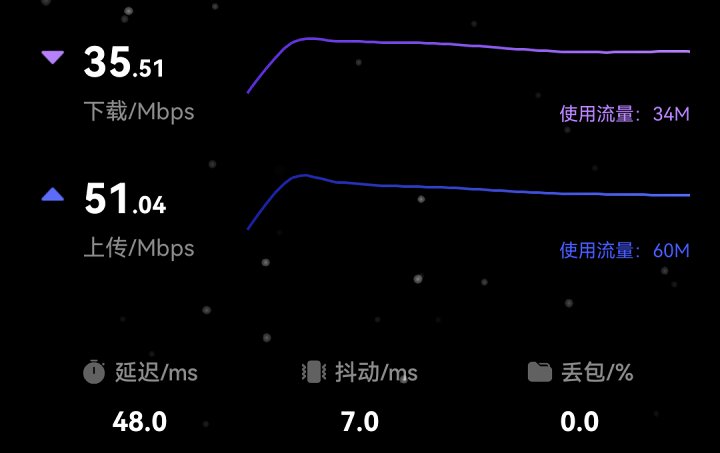
Typical N41 high-load scenarios in universities
Generally, N41 and N78 are especially prone to high load situations. At this time, try to check if your environment has N79 and N1 and escape to safety.
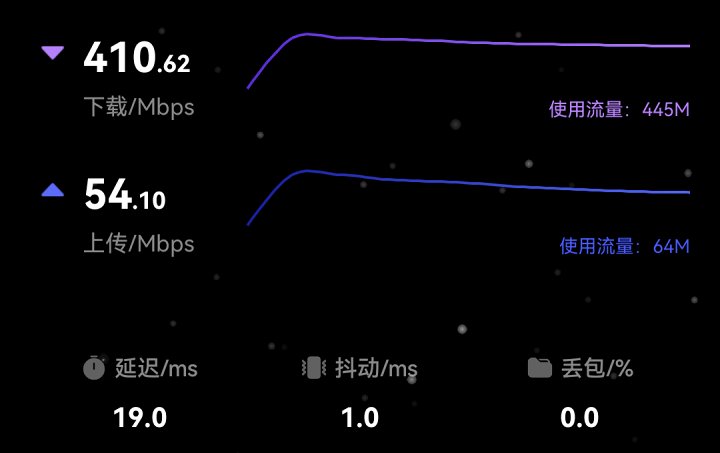
Escaped to N79 for refuge
———— Network Rescue Plan · Equipment Selection Edition ————
After all this preparation, we finally arrive at the equipment purchasing section. Based on the above, you can mainly select the equipment you need based on these criteria. Below are several typical suitable equipment for your reference. For specific device performance, supported bands, and whether antennas are supported, you can look it up. Talking too much here just turns into a bit of a criticism.
1. The environment has three major indicators and an ideal speed test experience, with frequent outings.
For these users, choosing a MIFI is more suitable. If the network quality is good, you can choose any device, and picking a MIFI is more convenient to take on the go. MIFI means devices include entry-level R106, Gexing, Yingteng, etc. (V510 modem, requires modification).
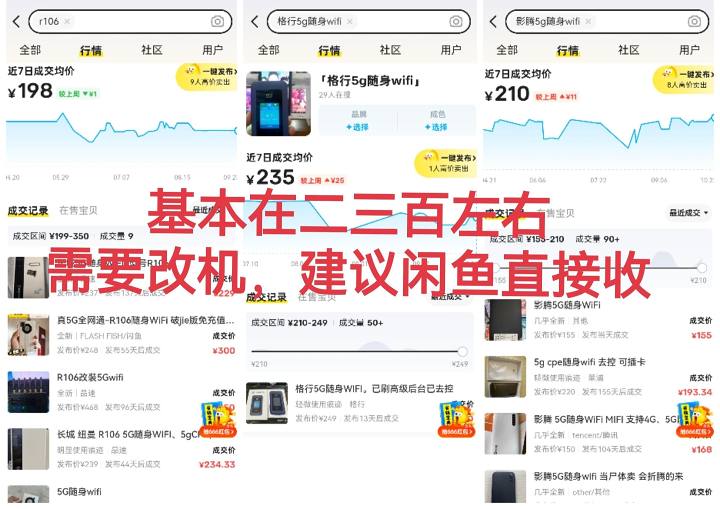
The V510 is portable with me; beginners recommend buying it directly
Mid-range Aloca (X55 modem, needs modification) and ZTE F50 (T760, business card size, not included).Batterynetwork port, may need to change the heat dissipation), Kunpeng C2000 (V510, about palm-sized, no battery but with Ethernet), etc.
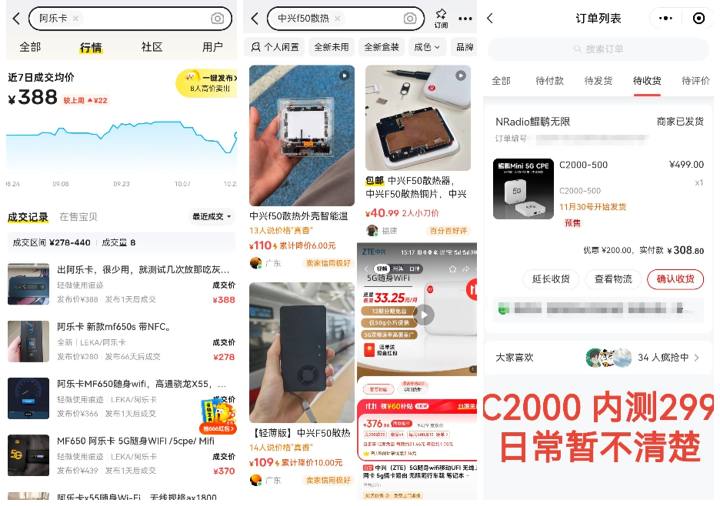
If you need to make changes, it's best to just buy them directly
For high-end devices, there's the ZTE U50 Pro (x62 modem), but I don't recommend Huawei's 5G because it's really old. Choose based on your budget and preferences, since the network conditions are good. Older phones can cool well and use hotspots for better use.
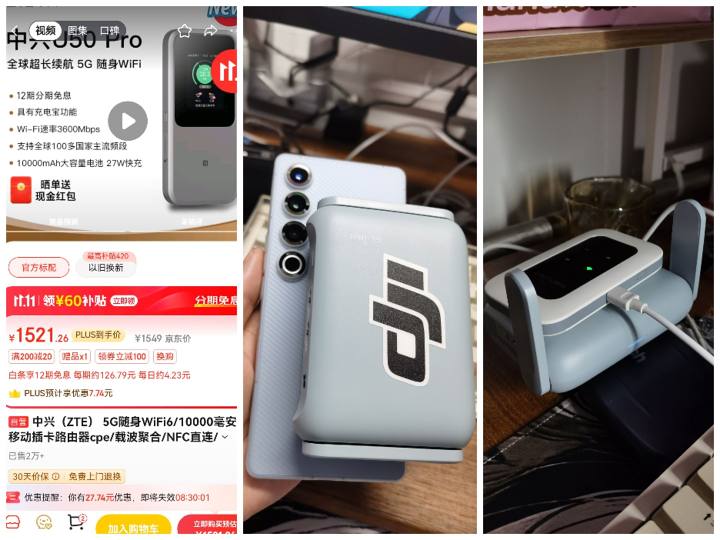
Old phones can also be converted to CPE; if interested, we can release them laterTutorial
2. The three major indicators are slightly weak but the speed test experience is acceptable, or after moving indoors to find a spot with good indicators, it still works.
This means your base station is decent, but the signal at your location isn't very good. If you need to go out, you can buy one of the products above and place them in a spot with good signal. For old phones, you can also switch to direct power supply + router. If it's basically a fixed environment, choose a CPEUser experienceBetter. For entry-level models, you can choose Kunpeng C8-600, Meitan 571, 601 (C8-600 reskin), Unicom OEM VN007+, and a range of Unisoc V510 devices, priced around 500 yuan, sometimes under 400 yuan. However, the V510's upper limit is basically only 800m, so if you move a bit and you can spend over 800, it might not be enough.
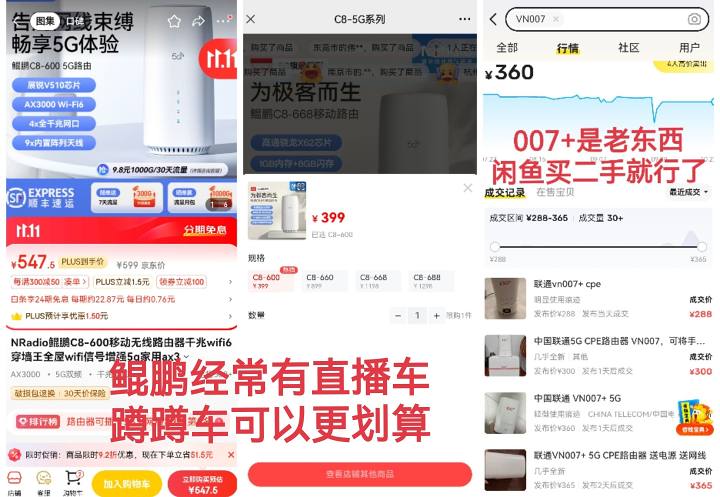
Both the P1 and 2 are Kunpeng C8-600s, and the driving price is clearly more cost-effective
For the mid-range, you can choose the Fenghuo 1st generation on Xianyu, Huawei 370 372, ZTE 801, 888, 8020. These are the veteran players of the Big Three Xianyu Reemployment and all around 1,000 yuan.
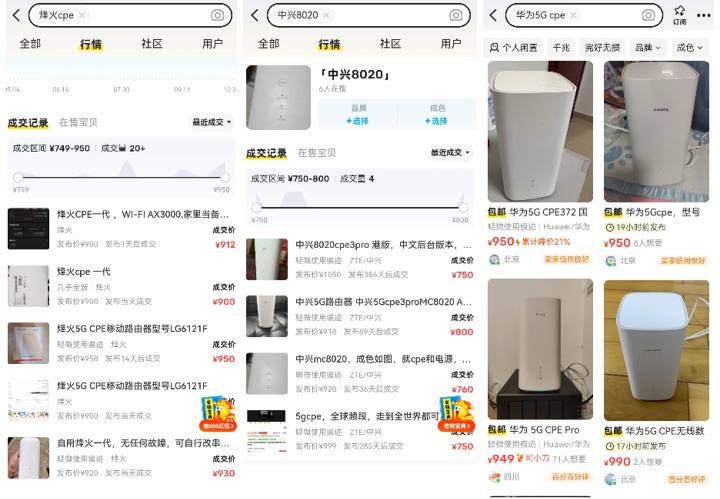
Lian Po is old; can he still eat?
For new phones, check out Kunpeng's C8-660/668, both X62 modems, support the OpenWRT system, and currently the only official CPE that supports OP (not sure what OP does, so don't worry about it).
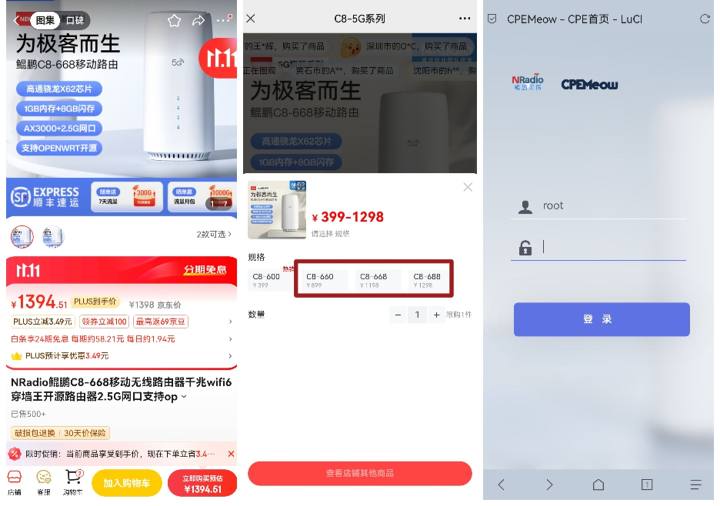
Also, the driving price is clearly more cost-effective
Currently, the high-end T0 models are undisputed only with the FiberHome Pro and Huawei Smart Selection 381, both strong in every aspect. However, both of these things are a bit abstract: the former's 5GA devices do not support N79 (not eligible for Mobile Broadcasting's 5GA), while the latter only provides a gigabit port (with good base stations, it runs more than just gigabit).
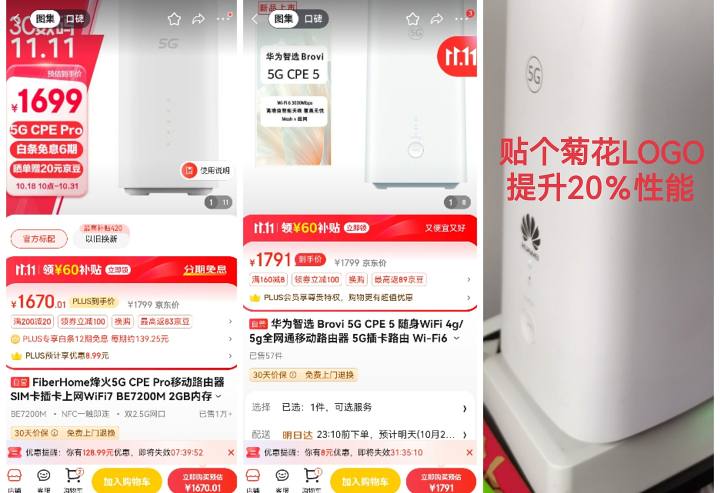
Top-tier Wolong Fengchu, with impressive performance and price
Still in internal testing are Kunpeng C8/C5800-688 (advertised as 381 with the same baseband; I tested it using their compatible card and ran 1400Mbps downstream and 300m uphill speed. Supports simultaneous backup of four SIM cards and supports OP).
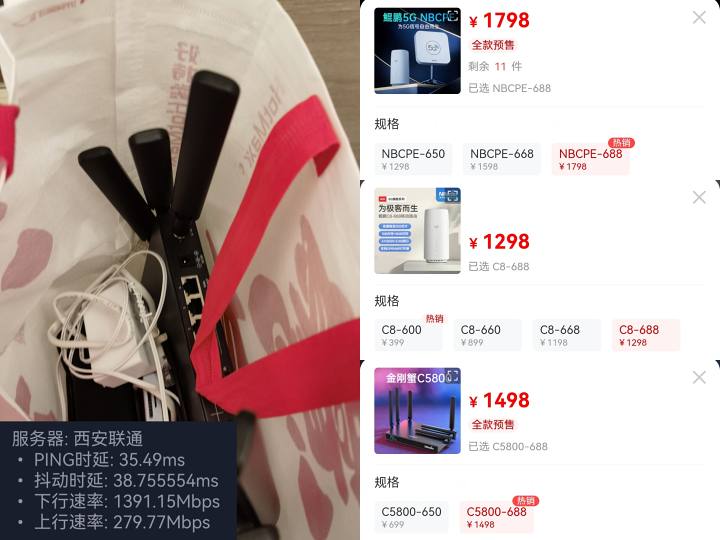
The exterior is exaggerated, but the internal testing experience is quite good
Still in PPTProducts include ZTE 5GA AICPE and the rather quirky Tongze X300Max (which Xianyu has have it) are unbeatable on paper, but actual experience is uncertain.
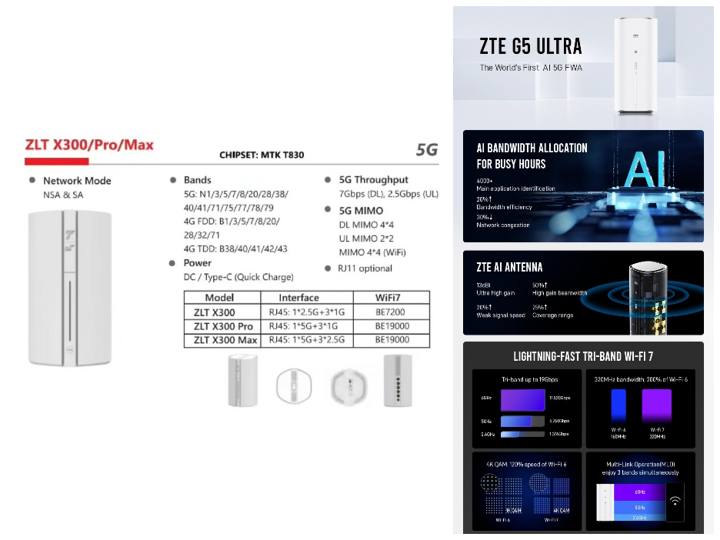
Not recommended to try
3. Three major indicators are acceptable, but the network experience is poor
This is a typical case of base stations with extremely high loads, which mostly occur in universities and urban villages. If your environment has N79, use devices that support N79 to lock the N79 band (that's how I use it). If you don't have N79, you'll need to find ways to lock in some low-load frequency cell zones. Or for more distant communities, look further away specifically for solution 4.
4. The three major indicators and the network are all poor
This usually appears in suburban or undeveloped areas. When going out, indoor cell phone signals are around -100, but outside it works well at around -90. You can choose FiberHome Pro or Smart Selection 381 to lock in these frequency bands. These two have strong signals: my dorm phone signal is -105, and 381 can go as low as -88.
But what if your phone can't connect to 5G, or if there are no good base stations nearby? Connect to a farther base station! Some CPEs can be equipped with external antennas, such as Fenghuo Gen 1 and 2. However, antenna feeders are relatively thick and stiff and need to be avoided as much as possible to bend, which is not very friendly for spaces with limited space [real music].
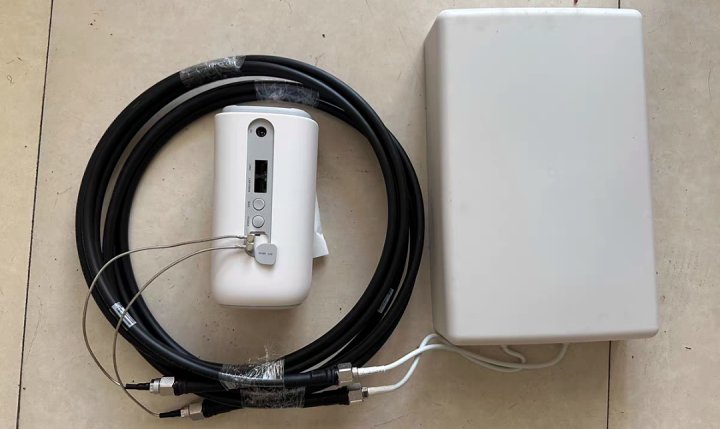
The smallest is the CPE body
Some manufacturers also offer outdoor CPEs, such as Huawei, TD Bridge, and Tongze. Wouldn't simply hanging CPEs outdoors allow them to receive farther signals? That's true, but pure outdoor CPE is generally for industrial use targeting B-end customers; C-end users basically don't have any.
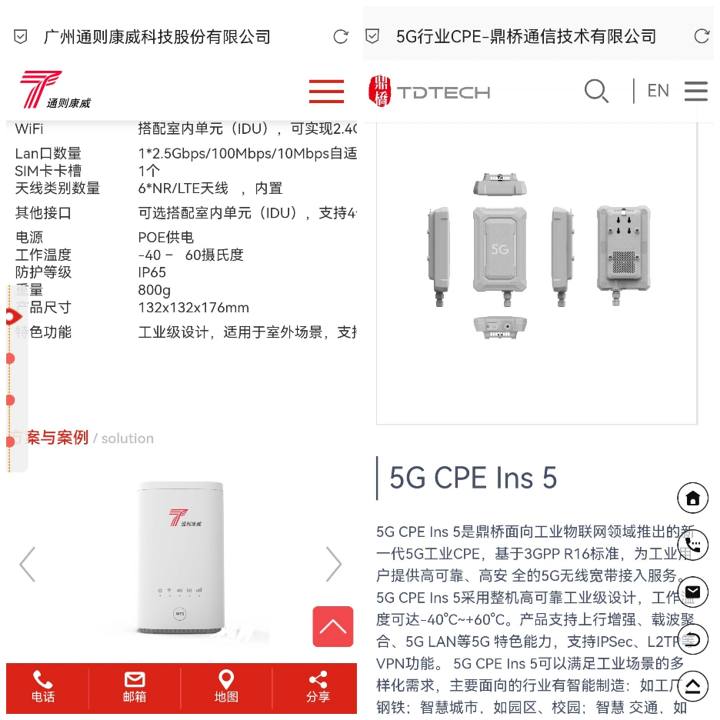
Industrial outdoor machines
This year, Kunpeng launched an "NBCPE" model, which can basically be seen as an outdoor unit + antenna combination. It also splits into outdoor unit + indoor unit, directly using the outdoor unit as the antenna. The POE line supplies power to the outdoor unit and transmits data back, which then distributes it to terminal devices from the indoor unit.
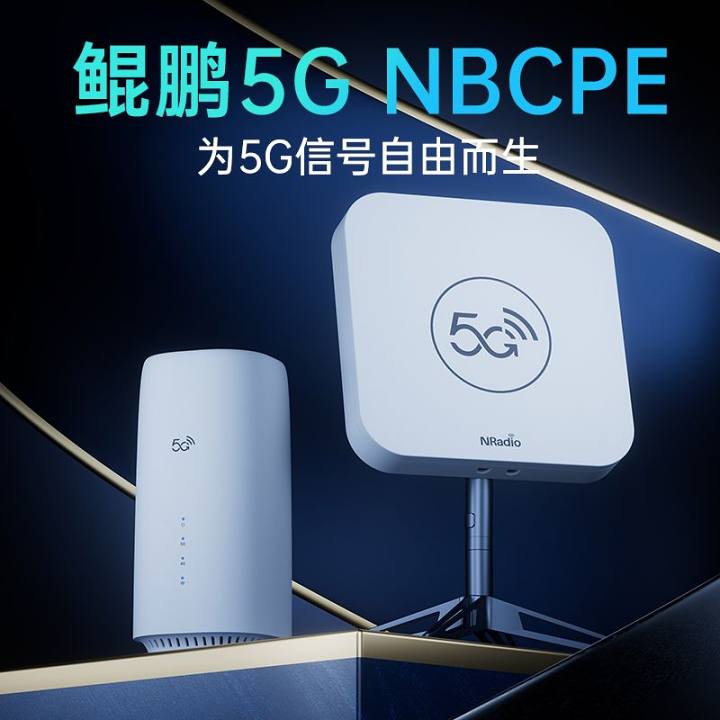
Kunpeng promotional image
Relatively speaking, network cables are cheaper and easier to route than feeder cables. The included 20M cable basically meets most people's needs, and if not, buying a super-long cable isn't expensive. You can check out this guy's video for real-world data.
[Link] Kunpeng NBCPE with 30db signal boost...
If none of the above can save you, then you can only study bridges, high-power directional antennas, or wait for someone in China to build Starlink. The old guy is really in trouble
———— Network Rescue Plan · Card Selection Edition————
Once you understand the network environment and confirm your device, the next step is to choose a SIM card. Based on the previous tests, choose the card that best suits your network experience from the carrier. Cards are mainly divided into legitimate mobile SIM cards and IoT device cards.
The era of "fee reduction and speed improvements" for legitimate SIM cards is over. There are basically no good SIM cards left (I can't even sell cards anymore). Some places have their own high-data plans within the province, such as Guangdong Unicom for 30 yuan and 495GB. Other provinces might have some as well. If you need one, feel free to message me privately (type so I can earn some money). If it's bigStudentyou can try going to your own campus service center (if not available on campus, go to the nearest one) and directly negotiate with the manager about adding "campus data." Don't ask those seniors who don't know which level of agent they use; campus data is most likely possible, and in some places it can even reach several thousand GB (actual tests show you can be more tactful). If you can't add data, you can also ask whether to offer work-study programs, possibly getting an unlimited data card for work without paying (which you will have to pay later).
⚠ The key point is that the so-called "double no restriction" in official cards is not recommended for beginners reading this tutorial!! This month, the gambling circle has been scammed out of tens of thousands—don't easily become a freeloader!! ⚠
(If you insist on giving it away, you might as well cut it off for me)
IoT is quite interesting. There are various IoT device card providers on the market. The cheaper ones are China Unicom and Broadcasting Corporation. China Telecom may have had some issues recently—usage can't exceed 300GB—so don't consider China Telecom for now. Mobile basically doesn't have any better options. Many unscrupulous sellers promote broadcasting as mobile and say it's the same as you. So why not just buy broadcasting directly? We generally call the broadcasting card a "running card," basically 39 or 49 with a rated 1000G or unlimited usage. In reality, you can use up to nearly 1000G, but if you use too much in one day or in some situation, the card will be sealed immediately. The solution is to get another card. So unless your usage is small and only the wide-range mobile frequency band works, don't get on the broadcasting card unless absolutely necessary (I also sell this card). For these kinds of strange cards, just pick a card dealer you like. After all, it's a mixed bag, just stuff from the traffic pool. If you encounter a bit of a trap, feel free to post it in the comments so others can avoid pitfalls. On Unicom's side, the ones widely recognized in the industry as decent are the "Xiaowu Card" and "Zhilianxing" (Zhilianxing has had some incidents before it ran away, so please consider carefully). These two, along with the previously mentioned broadcasting "runaway cards," are both bound to devices that are installed for the first time, and switching devices will lock the card [yyds].
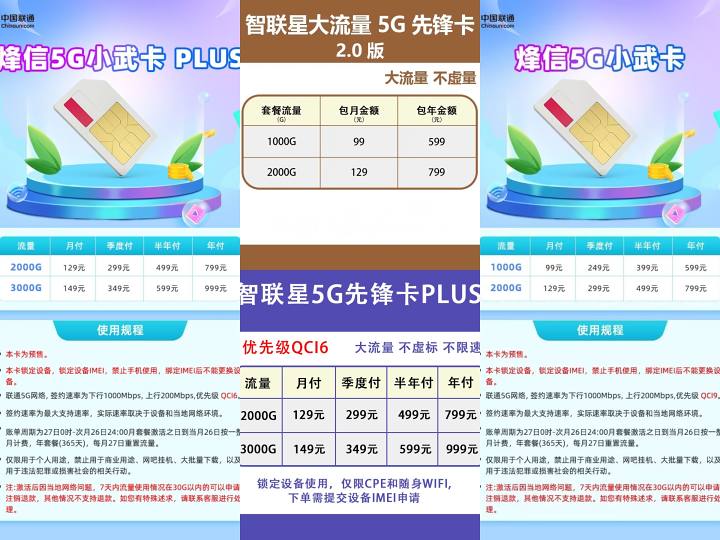
Xiao Wuka and Zhilianxing
Many manufacturers also have devices with built-in eSIM IoT data (the flagship models of the Big Three usually don't have it). These built-in data usually get stuck on a line that feels "a bit expensive," usually priced between 599 and 799 yuan per year, with monthly data of 1000 or 1500GB. It's still a bit more expensive than the above, but big companies generally don't waste data, and they don't require a SIM card, which suits most people. Kunpeng is a bit unusual. It already has a built-in card and even got an external Kunpeng Infinite Card. The Kunpeng community calls it the "God Card" [get me one], and the pricing is indeed quite attractive, and the speed is decent. I've used it to run 1560Mbps, but it's only for Kunpeng devices.
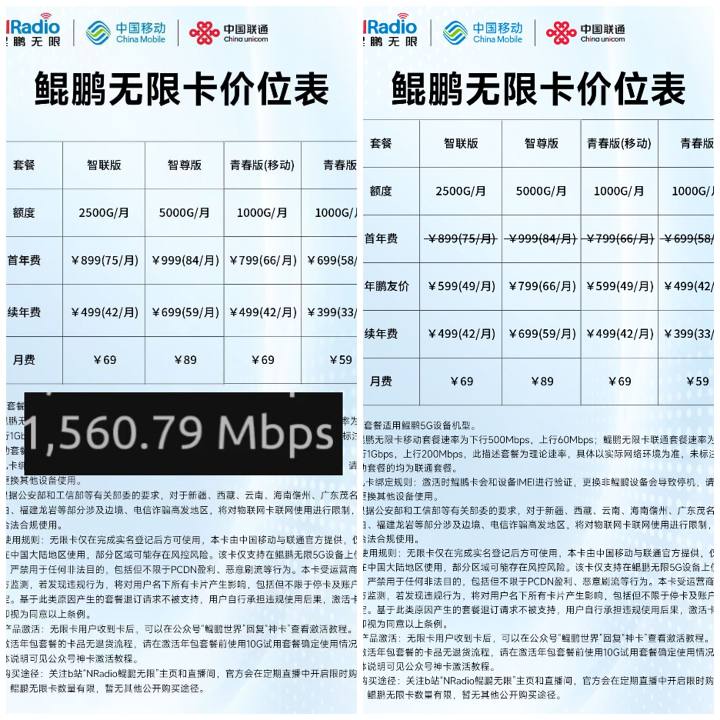
Kunpeng "miracle card": daily price on the left, driving price on the right
Of course, you have ways to sneak in a certain data card, but I won't go into detail here—you'll eventually know what "cross-streaming" means.
Finally, let me explain the grading of card numbers. There are mainly two indicators. One is "contract rate," the other is "QCI priority."
For regular SIM cards, the more expensive the plan, the higher the speed. The most common is 300Mbps downlink speed, above 500Mbps (Gold, Premium), and 1Gbps (Platinum, Speed). For ordinary users, 1Gbps is basically the best. Above that, there are 2Gbps, 4Gbps, or even 40Gbps, which are generally special permissions. Uplink speeds are generally 100 or 200 Mbps, with 1Gbps in Shandong. Some provinces offer generous speeds, such as Shaanxi Mobile's 1G downlink rate, Shandong Telecom's over 2G, and Hubei's even more bizarre 4Gbps both uplink and downlink speeds (whether that's true is unknown). Besides asking the carrier or seller, the only way to check the speed is basically by plugging in devices that support speed checking. However, this speed only represents the maximum speed you can reach within the base station's allowance; it does not mean you can always maintain this speed (unless your subscription speed is ridiculously slow). Most IoT device cards have a signing speed of 1000 for downlink and 200 uplink (Unicom).
Priority refers to your priority level in congested environments, but this experience is a bit mystical. You can compare and feel it yourself—don't get too hung up on it [yyds]. QCI levels are most commonly 6, 8, and 9. The smaller the number, the higher the access priority. The method to check is the same as above.
——————Congratulations, you've reached a minor milestone——————
Thank you for patiently reading this far. This graphic and text took nearly a month from planning to coming out, and all my CPE experience from two and a half years of work is written into it (really, two and a half years,FreshmanFrom the start until the first semester of junior year). When I first started college and was tormented by campus websites, I searched all the major platforms and watched countless posts and videos. Later, after joining various groups, I realized this circle was relatively niche. Some experience and skills were mostly passed down by word of mouth within the community, but many people were troubled by the internet. Back then, I wondered if I could one day summarize the experiences and techniques of the big names and seniors, and write them in an easy-to-understand way for friends in need to get into this circle. Maybe today I can give myself an answer at that time.
Here, I sincerely thank every group member and blogger who patiently answered my questions and resolved questions on this journey. Special thanks to the super boss Fish Bro@双人鱼在线He generously taught me, helped me solve my own network problems, and taught me a lot of related knowledge. Cheers for Brother Yu!!!!
Finally, thanks to the manufacturer NRadio Kunpeng Infinite@鲲鹏无限张导To support some of my creative ideas, I established the Campus Ambassador Program to bring together more students who are willing to work hard and work together to benefit the student community (Campus Special Edition).

Oh Yeah Campus Ambassador
Kunpeng's creation of OP CPE and NBCPE, as a "new force," can bring fresh vitality to the industry, which is quite commendable. But that doesn't mean I won't speak ill of them after taking the money. Kunpeng's supporting software is inadequate and the "long-term pre-sale" problem needs to be fixed
。
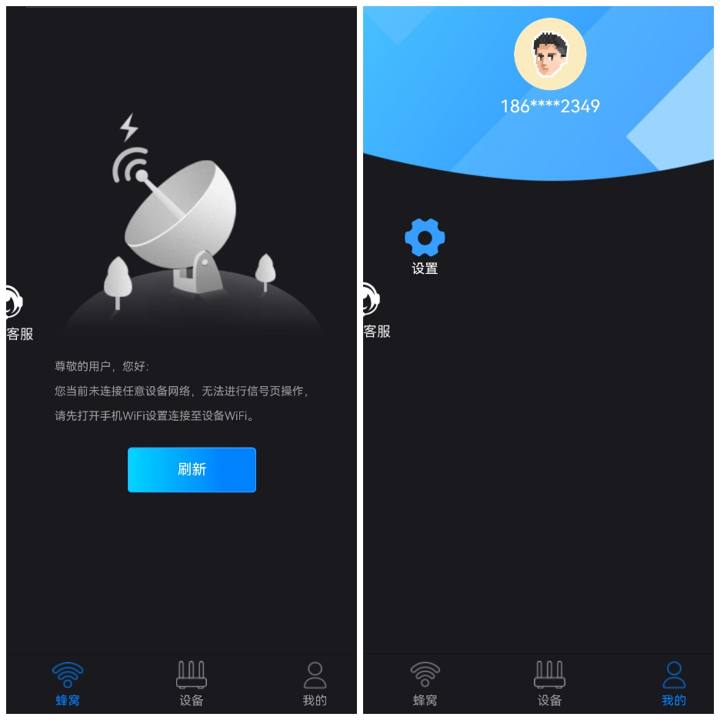
This software dreams back to the millennium
Exist2024As the year draws to a close, as carriers advance 5G construction and personal terminal devices increase their demand for networks, we rarely hear the notion that "5G is useless." 5G has long been quietly integrated into everyone's daily lives. Future 5GA, 6G, and even moreUpdateWhat kind of future will technology bring us? With the support of communication technology, our lives become more exciting and communication closer. Today, each of us is a beneficiary of 5G.
————————————————————
That's all for this article with images. Thank you again for reading this far. I hope this is helpful to you. If there are any mistakes, feel free to point them out. If you're a beginner or a beginner, feel free to leave a comment below. If you want to see more device reviews or other content, feel free to leave a comment or send a private message. Later, I'll make a video of this article and post it on Bilibili accounts with the same ID (though who knows when it'll begin). I'm asking everyone to follow and share
Original link:https://www.coolapk.com/…
。
![[Open Source Reading] January 2024 ≈ 400 carefully edited book source compilation and update - Baiyun Blog](https://www.bybk.cc/wp-content/uploads/img/af867764c3780f0b7da88376fca7bf92.png)
![[Open Source Reading] November 950+ carefully proofread book source compilation and update - Baiyun Blog](https://www.bybk.cc/wp-content/uploads/2023/02/Screenshot_20230222-1001582.png)
![[Open Source Reading] October 1300 Book Source Update - Baiyun Blog](https://www.bybk.cc/wp-content/uploads/img/1eeb6ae31cde88ab39faa2f19651638d.jpeg)
![[VMOS PRO 2.9.6 Member Edition] - Baiyun Blog](https://www.bybk.cc/wp-content/uploads/img/c303a7a50d3ebfa235cc380190db2980.png)
![[Open Source Reading] November 950+ carefully proofread book source compilation and update - Baiyun Blog](https://www.bybk.cc/wp-content/uploads/2023/02/Screenshot_20230222-1001582-1024x593.png)




No comments yet