
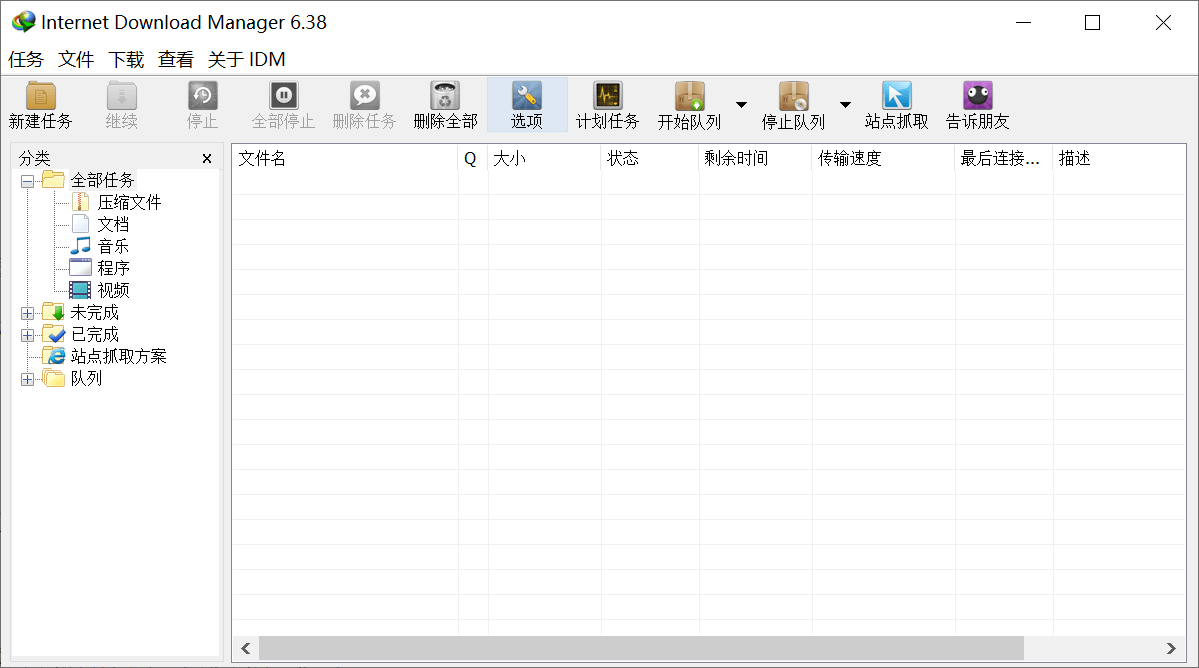
Software Introduction:
Internet Download Manager (IDM) can increase your download speed up to five times the original, schedule download tasks, or resume interrupted downloads. IDM's recovery function can recover downloads interrupted due to network disconnection, network issues, computer shutdowns, or unexpected power outages. This software uses dynamic file splitting and multi-point download technology, reusing existing connections without requiring re-login. Its intelligent speed technology dynamically adjusts applications based on different connection types to maximize download speed.
IDM supports download queues, firewalls, proxies and image servers, redirects, cookies, authorized directories, and various server platforms. It is withInternet Explorer and Netscape Communicator are tightly integrated to automatically handle your download needs. This software also offers excellent download logic optimization, virus scanning, and a range of preferences.
It supports multiple browsers, including IE, Safari, Google Chrome, Firefox, and Opera as mainstream browsers. With its built-in browser add-in feature, it supports all browsers. IDM downloads HTTP links very quickly and stably, and its unique download method avoids the common issues of internet speed fluctuations. Although it does not support P2P protocols, as BT and eDonkey became less popular, IDM quickly emerged with its reputation as a "network disk weapon." Additionally, IDM's filename recognition is very accurate; If the server-side filename differs from the downloaded filename, the IDM will prompt you to correct it.
Regarding the IDM unregistered pop-up:
Today, the latest ad-free pop-up version was released. According to user feedback, the following unauthorized pop-up windows may still appear during use:
"The IDM master executable file is corrupted. They may have been infected by a virus.
Please download the latest version of IDM from our website and override the installation to your current version. Simply run the downloaded IDM installer, and it will replace the corrupted files. Don't worry, all downloads and IDM settings will not be affected. ”
The IDM main executable file is corrupted, possibly due to a virus infection. Please download the latest version of IDM from our website and override the installation to your current version. Simply run the downloaded IDM installer, and it will replace the corrupted files. Don't worry, all downloads and IDM settings will not be affected. The crack patch has been reapplied to fix the pop-up issue that appeared after some use. As of the time of publication, no pop-up behavior has been observed. If you encounter this, please leave a comment and provide feedback. Friendly reminder: If IDM still shows pop-ups, please use the IDM Patch KeyGen crack patch, place it in the IDM Green Portable version of the IDM app directory, and run the crack patch to apply the patch again.
Description of the Green Portable Version:
1. Based on the official cracked version, no registration required, no need to forge serial numbers, and startup is an unauthorized-free version!
2. No need to block the internet, no pop-ups! Disabling network updates will not trigger IDM update notifications!
3. Removed daily pop-up reminders and eliminated automatic web pop-up behavior after installation; by default, it does not start with the system;
4. Removed unnecessary menu items and extra buttons in the window; Deleted all multilingual files and all help document files;
5. Introduced a new IDM 3D skin for a fresher user interface, with the default launch in Chinese Simplified Chinese;
About updates and upgrades:
To update or upgrade the Green Portable version, first run the IDMAppIDM [Uninstall.bat] batch to terminate the program, then restart the computer. After restarting, copy the new version of the IDM file to replace the old file for the upgrade.
Chinese setup tutorial:
For installed versions, please note that IDM defaults to an English interface. Usually, after installation and cracking, after using it for a while, it will automatically prompt you to switch languages. If IDM does not prompt you to switch to Chinese, you can manually set it by first closing IDM, then deleting all files in the Languages folder under the installation directory. Then, click here to download the Chinese language pack, extract it, and copy it to the Languages folder. Open IDM, click View – Language – Chinese Simplified to switch to the Chinese interface.
![[Open Source Reading] January 2024 ≈ 400 carefully edited book source compilation and update - Baiyun Blog](https://www.bybk.cc/wp-content/uploads/img/af867764c3780f0b7da88376fca7bf92.png)
![[Open Source Reading] November 950+ carefully proofread book source compilation and update - Baiyun Blog](https://www.bybk.cc/wp-content/uploads/2023/02/Screenshot_20230222-1001582.png)
![[Open Source Reading] October 1300 Book Source Update - Baiyun Blog](https://www.bybk.cc/wp-content/uploads/img/1eeb6ae31cde88ab39faa2f19651638d.jpeg)
![[VMOS PRO 2.9.6 Member Edition] - Baiyun Blog](https://www.bybk.cc/wp-content/uploads/img/c303a7a50d3ebfa235cc380190db2980.png)
![[Open Source Reading] November 950+ carefully proofread book source compilation and update - Baiyun Blog](https://www.bybk.cc/wp-content/uploads/2023/02/Screenshot_20230222-1001582-1024x593.png)




No comments yet